Member portal and memberships
Let customers create an account to manage bookings and chat with you, and sell recurring membership plans with discounts and included services.
The member portal gives customers their own account to view appointments, manage a membership and chat with you. Membership plans turn that portal into a recurring revenue stream, with discounts or included services billed automatically every month or year.
Turn on the member portal
- Open Company settings and go to the Member portal tab.
- Tick Enable member portal.
- Optionally tick Enable chat and choose Who can chat.
- Click Save.
Customers can then create an account (name, email and password) or sign in from your member portal address, to see their upcoming appointments, book again, and view or join a membership.
Create a membership plan
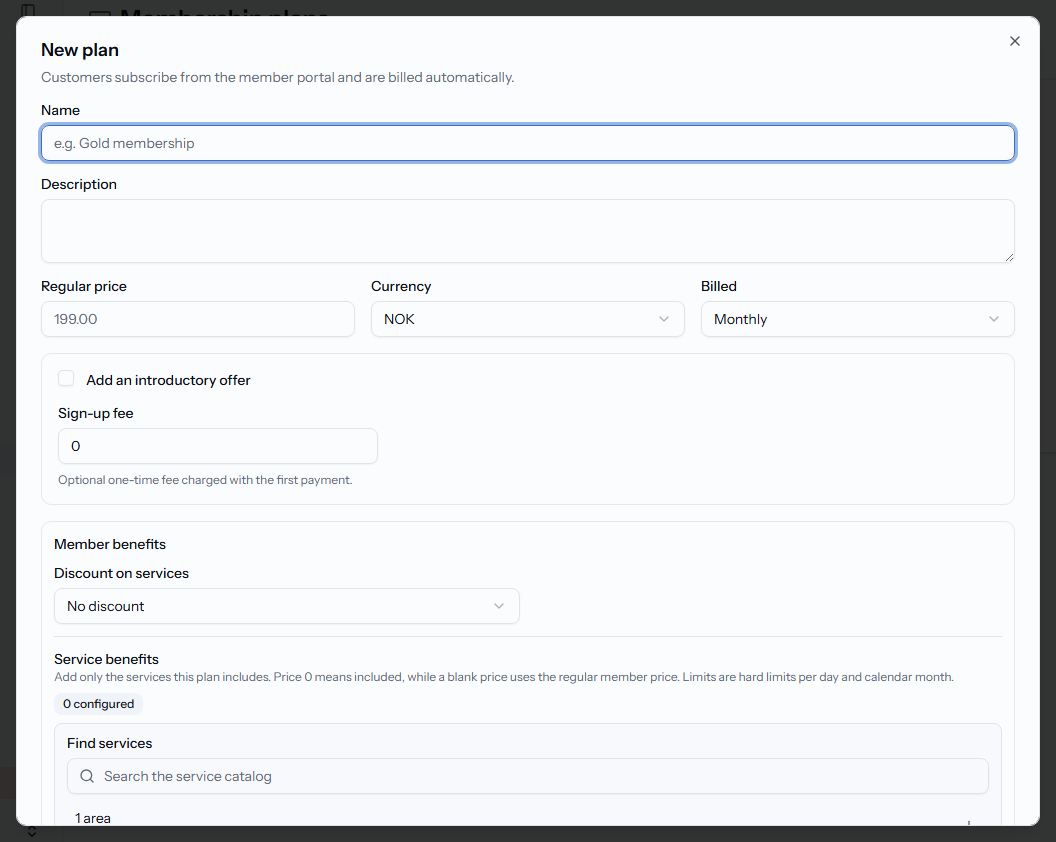
- Open Membership plans and click New plan.
- Set the Name, Description, Regular price, Currency and whether it's Billed monthly or yearly.
- Optionally add an introductory offer (a lower price for a set number of billing cycles) and a one-time Sign-up fee.
- Under Member benefits, set a Discount on services (percentage or fixed amount), and add specific Service benefits — a member price, and optional daily and monthly limits, per service.
- Choose whether the plan is Active (can be purchased and renewed) and Visible in portal — a hidden plan can still be sold with a direct link.
- Click Create plan.
Invite a customer to subscribe
Click Send link on a plan's card, search for an existing customer or enter a new contact's email or phone, choose Email or SMS, and the message language. The customer receives a personal link, is signed in automatically, and can subscribe right away.
What the customer sees
From their member portal, a customer can choose a plan and click Join, view their membership status (Active, Past due, Canceled, Pending, Paused), see the terms they signed up under, and track remaining daily or monthly service allowances. They can click Cancel membership to end it themselves — benefits stop once the cancellation completes.
Related articles
Message your customers
Chat directly with customers who sign in to your member portal, right from the Messages page.
Add and manage customers
Build your customer directory, search and filter it, and find customers who haven't booked in a while.
Service packages and pricing
Sell multi-visit packages, bundle several services together, and run time-limited or last-minute discounts.