Service packages and pricing
Sell multi-visit packages, bundle several services together, and run time-limited or last-minute discounts.
Beyond a single price per service, Calendia gives you several ways to package and discount what you sell — from a 3-visit package of the same treatment to a short-lived promotional price.
Sell a multi-visit package
A service package lets customers pay once for several visits of the same service, like "3x Massage."
- Open a service and scroll to Service packages.
- Click Add package.
- Enter a Name, the number of Units, and the package Price.
- Set the package's own Checkout requirement (payment, deposit, or card on file) if it should differ from the service.
- Save the service.
Bundle several services together
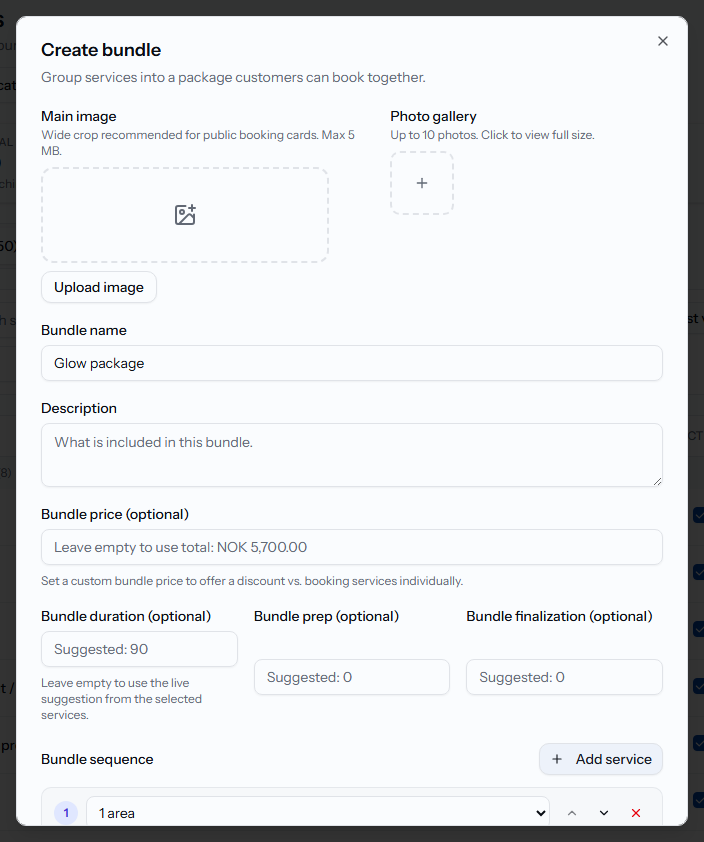
A bundle groups different services into one bookable item, for example "Cut + color package."
- On the Services page, click New bundle.
- Add a Bundle name, description, and optionally upload images.
- Set a Bundle price (optional) to offer a discount versus booking the services individually — leave it empty to charge the total of the included services.
- Under Bundle sequence, click Add service to add each service in the order customers will receive them.
- Save the bundle.
Run a time-limited promotion
- On a service card, click to Add time-limited pricing.
- Enter the Promotional price, or pick a percentage off with the discount picker.
- Set Starts and Ends dates.
- Choose whether the promotion applies Only for appointments within this period, or to anything booked during that window regardless of when the appointment happens.
- Click Add promotion.
Automatic last-minute discounts
Turn on Last-minute discount in a service's settings to automatically discount appointments booked shortly before they start. Set the Hours before appointment window, the Discount type (Percent or Fixed amount), and the Discount value.
Related articles
Create services and categories
Add the services you offer, group them into categories, and control what customers see and pay.
Campaigns and promotions
Build a campaign landing page to capture leads, share it, and run promotion or referral codes.
Sell services and products
Build a sale in the register workspace — add services or products, attach a customer, apply a discount, and take payment.