Campaigns and promotions
Build a campaign landing page to capture leads, share it, and run promotion or referral codes.
A campaign in Calendia is its own landing page for promoting a service, bundle, or offer — separate from your main website — with built-in visit and lead tracking.
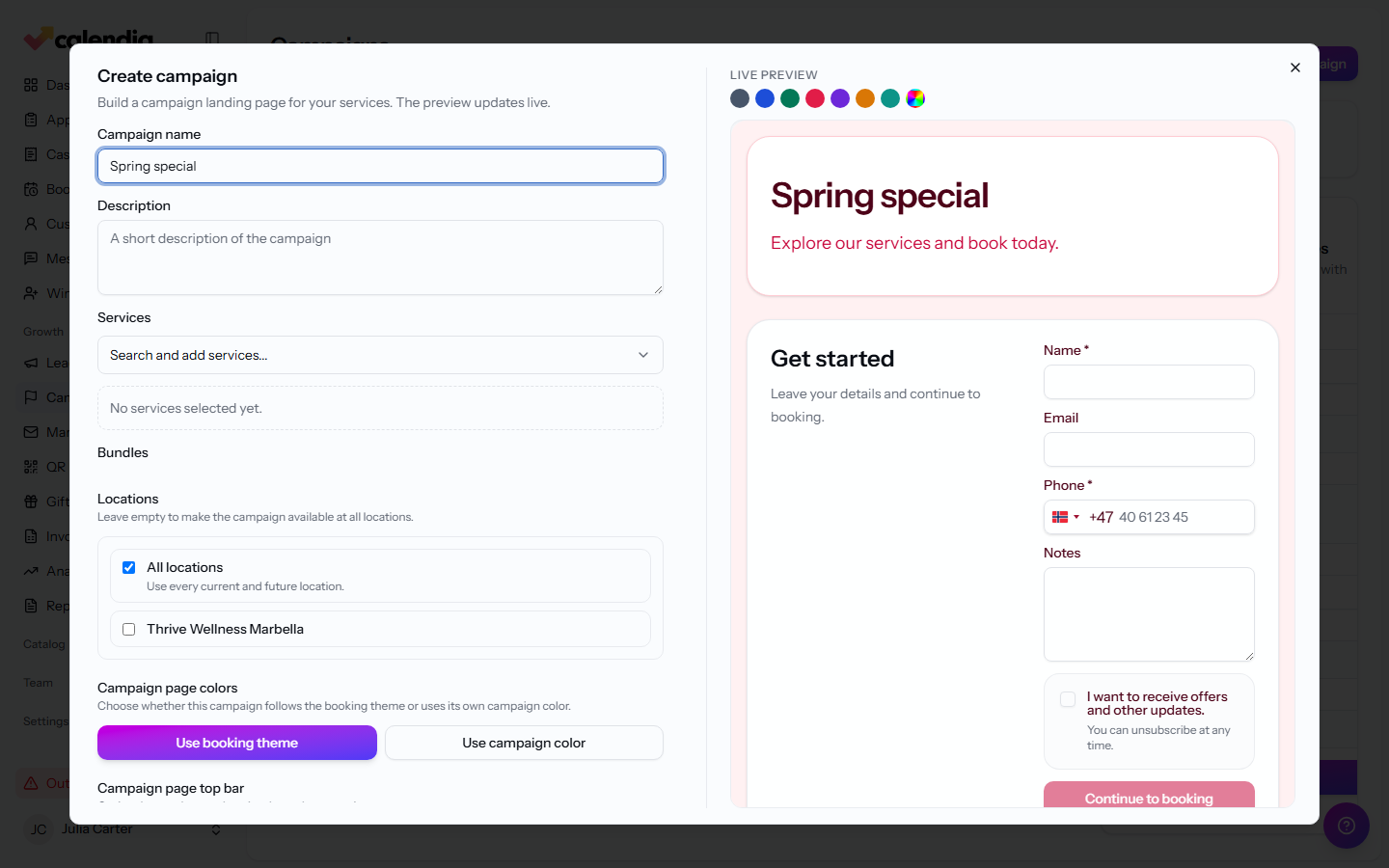
Create a campaign
- Go to Growth > Campaigns and click New campaign.
- Enter a Campaign name, a Slug for its URL, and a Description.
- Choose which Services and Bundles to feature, and which Locations it applies to.
- Set the Campaign page colors (Use booking theme, Use campaign color, or a Custom color), and optionally a Campaign page top bar and Campaign page sections.
- Check the Live preview as you go.
- Turn on Publish campaign when it's ready, then click Save campaign.
Share a campaign
Click Share on a campaign to open Create a shareable link. Pick where you're sharing it, add an optional Label, and Calendia generates a tracked link with a QR code you can download for print.
Send a broadcast to a campaign's leads
Click Send broadcast on a campaign to jump into Marketing and compose an email or SMS to the people it has captured. Every campaign also shows Visits, Leads, Lead rate, and Visitor booking rate so you can see how it's performing.
Promotion and referral codes
Under Promotion and referral codes, click Add code to create a discount code. Set the Discount type (Percent discount or Fixed amount discount) and Discount value, choose whether it Applies to services or all services, and optionally attach an Influencer payout for referral-style codes.
Frequently asked questions
What's the difference between a campaign and my main website?
Your Calendia website is your permanent homepage. A campaign is a separate, purpose-built landing page you create for a specific promotion, with its own tracking.
Related articles
Set a campaign price on a service
Add a temporary promotional price directly from Services, without creating a campaign page.
Leads
Track everyone who showed interest but hasn't booked yet, and follow up until they convert.
QR links
Turn any URL into a tracked, scannable link for flyers, posters, or your booking page.
Your Calendia website
Build your public homepage from ready-made templates and drag-and-drop sections, preview it on desktop and phone, and publish when it's ready.