API tokens and webhooks
Give an external system read or write access to your bookings and customers with an API token, or subscribe it to booking events with a webhook.
Calendia's API lets another system read your services, availability and bookings, or create customers, leads and bookings on your behalf. Webhooks let that system know the moment a booking is created, updated, rescheduled or cancelled.
Find your API details
Open Settings > API & Webhooks. The Base URL card shows the address every request is made against, scoped to your business. Every request needs an Authorization: Bearer <token> header. Click Download Postman collection to get a ready-made collection of every endpoint.
Create an API token
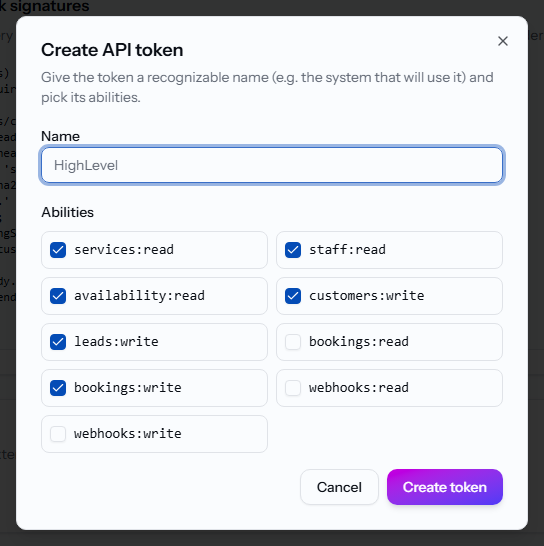
- In the API tokens card, click Create token.
- Give it a recognizable Name, such as the system that will use it.
- Tick the Abilities it needs, for example
bookings:writeorcustomers:write. - Click Create token.
- Copy the token from the Token created dialog immediately — it is only shown once.
Use Revoke next to a token to cut off its access immediately.
Subscribe to webhooks
- In the Webhook subscriptions card, click Add webhook.
- Give it a Name, an Endpoint URL on your system, and tick the Events to receive (
booking.created,booking.updated,booking.rescheduled,booking.cancelled). - Click Add webhook.
- Copy the one-time Webhook secret from the dialog that follows — you'll need it to verify deliveries.
Each delivery is a JSON POST with X-Calendia-Timestamp and X-Calendia-Signature headers (sha256=<hex>). Recompute the HMAC-SHA256 signature with your secret and compare it in constant time before trusting the payload.
The signed message is the value of X-Calendia-Timestamp, followed by . and the exact raw request body. Use the webhook secret as the HMAC key; do not decode and re-encode the JSON before verification.
Use Disable to pause a webhook without deleting it, Rotate secret if the secret leaks, and Delete to remove it for good. A webhook with repeated delivery failures shows the failure count and the last error under its row.
Browse the endpoints
The Endpoints card documents every route grouped by area — Catalog, Availability, Customers, Leads, Bookings and Webhooks — with the required ability, a sample request body and a sample response. Click an endpoint to expand it.
What information can an integration use?
A booking can contain several services. The API and booking webhooks include a services list with the saved service details, employee and timing for each part of the booking. Location, delivery mode and preparation, finishing and cooldown time help the receiving system understand the whole appointment. Actual start and end times are included when recorded; otherwise they are empty.
The service catalogue includes booking requirements and payment settings. The staff list shows active, bookable employees and their location. When creating a customer, an integration can optionally provide a date of birth in YYYY-MM-DD format.
Keep connected systems up to date
A booking.updated webhook can also report changes to payment status, actual appointment times or the services in a booking. Use the delivered booking details to refresh the connected system. Private booking notes are not included in webhook deliveries.
For developers: download the current Postman collection before updating your integration. When listing bookings, use next_cursor from the response to fetch the next page. When updating a booking, leaving out notes keeps the existing note; sending notes: null clears it.
Related articles
Connect an accounting or ERP system
Send your daily cash register sales, refunds and other financial activity straight into your accounting system instead of entering them by hand.
Use a custom domain
Serve your booking page or website from your own domain, such as www.yoursalon.com, instead of a Calendia address.
Calendia Pay card terminals
Accept in-person card payments on a terminal that posts straight to the right sale, with its own idle-screen ads between payments.